
Writing Powerful data ingestion pipelines with Azure Databricks Autoloader
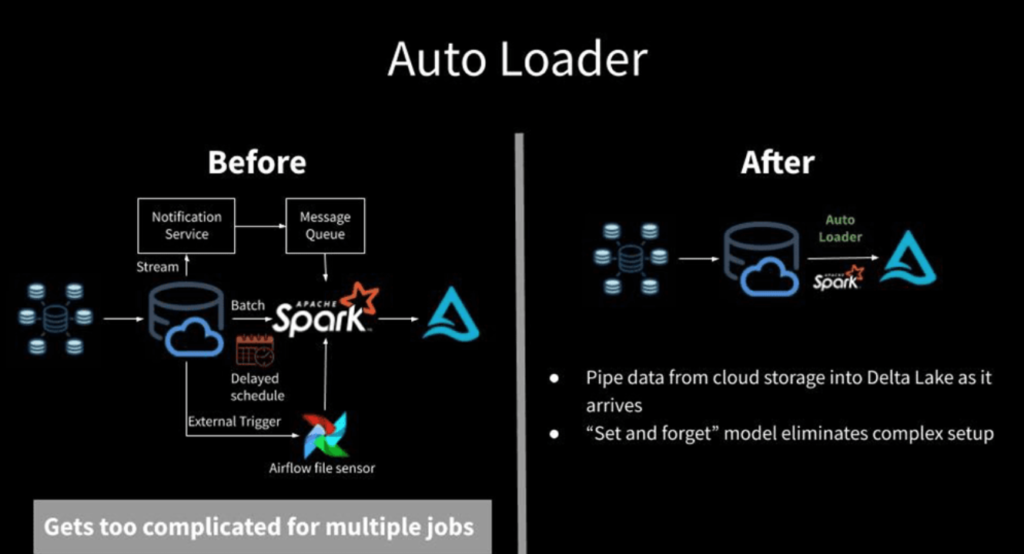
I have been using Azure Data Factory to ingest the files into ADLS Gen 2 for processing. Lately, I found many challenges when we use ADF for file ingestion. SO Let’s resolve these challenges with Databricks’s Autoloader.
Azure Architecture Best Practice for securing Azure Virtual Networks

While designing the azure landing zone we need to ensure that our network is secured.VNet protects inbound flow (from users) and outbound traffic flow (to the Internet). Now the question arises how do we secure this traffic? Azure provides services like Azure firewall and Azure Application Gateway. It is very confusing when to use Azure firewall vs. Azure Application Gateway. There can be other combinations that can make the design more and more complex. This article provides the definitive guide and scenarios-based approach to help what design should be used. When it should be used? How it should be used?
Troubleshooting user defined routes in Azure

In this blog, we will discuss how to troubleshoot the user-defined route in Azure. I have faced this issue in one of my projects. Typically when you want to test the traffic from a specific VM you will have to log in to the VM and see the output of the Traceroute command and it becomes cumbersome if you have so many routes because now you have to log in to each VM to verify whether the routes are working correctly or not. Another problem is that even if the routes are not working traceroute will not show why it is not working. So if you do not know why routes are not working you can not fix anything. To overcome this issue I wrote a small script that can be used as it is by changing the parameters and it will display the connectivity status (success or failure) if there is an issue then this script will also show what is causing that issue.
Azure landing zone design best practices

Recently I have come across a requirement to design the Azure landing zone for a customer who wants to migrate their workloads from on-premise to Azure. This article explains the best practices implemented in Azure landing zone design.
Dynamic Azure Automation with Ansible
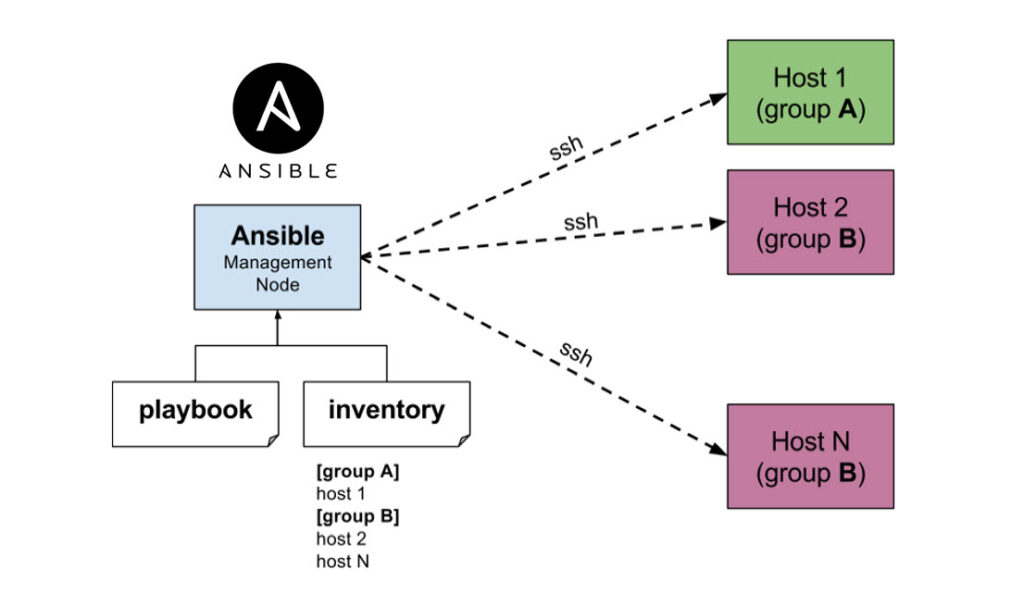
In this blog post, we will learn how to automate Azure workloads with Ansible. We will do the end-to-end automation for Azure virtual machine.
Bulk tagging of Azure resources with PowerShell

In this post, I have provided an important useful configurable script to tag multiple Azure resources or Resource Groups.
Deploying SQL server Always on Availability Group on Azure Kubernetes Services(AKS).
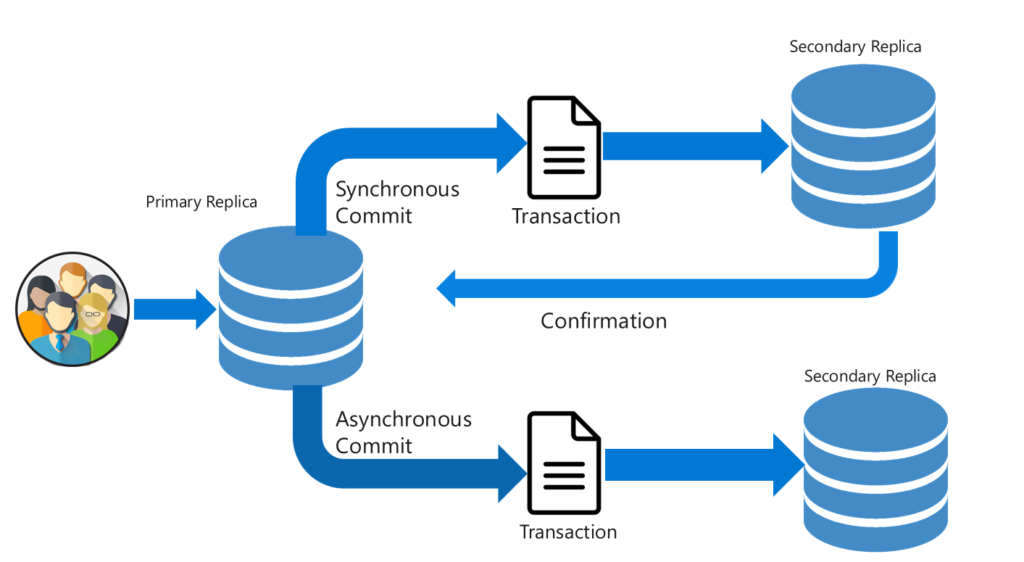
In this blog, we will learn how to deploy the SQL server Always on Availability group on Azure Kubernetes Services.
How to deploy SQL Server containers to a Kubernetes cluster for high availability?

In this blog, we will learn how to deploy the SQL server container on Azure Kubernetes services with High availability. We will use the persistent storage feature of Kubernetes to add resiliency to the solution. In this scenario, if the SQL server instance fails, Kubernetes will automatically re-create it in a new POD and attach it to the persistent volume. It will also provide protection from Node failure by recreating it again. If you are new to Kubernetes we will start by understanding the basic terminology of Kubernetes and its Architecture.
Retrieve Azure VM details by using PowerShell.
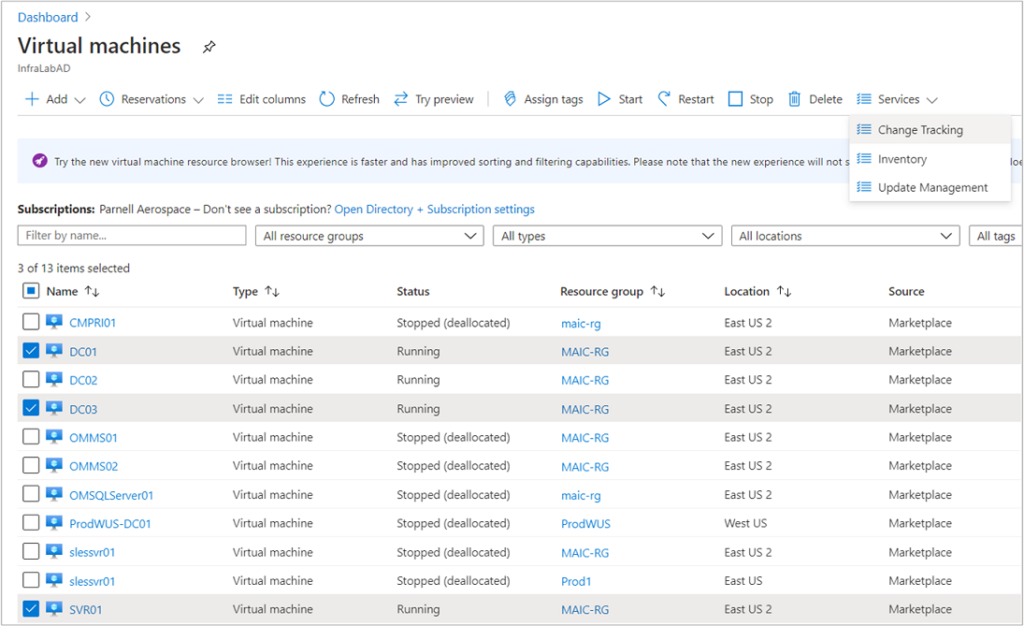
Suppose you built a large environment in Azure with more than 1000 Virtual machines. Now we need to provide the Virtual Machine details to the customer(or raise the SNOW ticket) and it is very difficult to collect each VM detail manually from Azure Portal. Also, there can be another use case if you want to verify the VMs to compare with each other to ensure all the VMs are created the same way. For example, the Cache setting for all the VMs should be Read /Write. You may also want to grab details of all the data disks and OS disks and their size, name info, and cache settings. This script grabs all the info in one shot and exports it into a CSV file for further manipulation.Let’s dive in.
How to deploy Databricks in your private VNet without exposing public IP address (VNet Injection)?

The default installation of databricks creates its own Virtual network and you do not have any control over it. But If you want to deploy Databricks into your own private network due to security reasons. So this blog is for you. We will learn how to deploy Databricks into its own Private VNet. Let’s dive in.